 6b2d6ccaae
[](https://renovatebot.com) This PR contains the following updates: | Package | Change | Age | Adoption | Passing | Confidence | Type | Update | |---|---|---|---|---|---|---|---| | [@types/node](https://togithub.com/DefinitelyTyped/DefinitelyTyped/tree/master/types/node) ([source](https://togithub.com/DefinitelyTyped/DefinitelyTyped/tree/HEAD/types/node)) | [`^20.11.5` -> `^20.14.2`](https://renovatebot.com/diffs/npm/@types%2fnode/20.13.0/20.14.2) | [](https://docs.renovatebot.com/merge-confidence/) | [](https://docs.renovatebot.com/merge-confidence/) | [](https://docs.renovatebot.com/merge-confidence/) | [](https://docs.renovatebot.com/merge-confidence/) | devDependencies | minor | | [@vscode/vsce](https://code.visualstudio.com) ([source](https://togithub.com/Microsoft/vsce)) | [`^2.22.0` -> `^2.27.0`](https://renovatebot.com/diffs/npm/@vscode%2fvsce/2.26.1/2.27.0) | [](https://docs.renovatebot.com/merge-confidence/) | [](https://docs.renovatebot.com/merge-confidence/) | [](https://docs.renovatebot.com/merge-confidence/) | [](https://docs.renovatebot.com/merge-confidence/) | devDependencies | minor | | [esbuild](https://togithub.com/evanw/esbuild) | [`^0.21.0` -> `^0.21.5`](https://renovatebot.com/diffs/npm/esbuild/0.21.4/0.21.5) | [](https://docs.renovatebot.com/merge-confidence/) | [](https://docs.renovatebot.com/merge-confidence/) | [](https://docs.renovatebot.com/merge-confidence/) | [](https://docs.renovatebot.com/merge-confidence/) | devDependencies | patch | | [ovsx](https://open-vsx.org) ([source](https://togithub.com/eclipse/openvsx/tree/HEAD/cli)) | [`^0.9.0` -> `^0.9.1`](https://renovatebot.com/diffs/npm/ovsx/0.9.1/0.9.1) | [](https://docs.renovatebot.com/merge-confidence/) | [](https://docs.renovatebot.com/merge-confidence/) | [](https://docs.renovatebot.com/merge-confidence/) | [](https://docs.renovatebot.com/merge-confidence/) | devDependencies | patch | | [prettier](https://prettier.io) ([source](https://togithub.com/prettier/prettier)) | [`^3.2.4` -> `^3.3.1`](https://renovatebot.com/diffs/npm/prettier/3.3.0/3.3.1) | [](https://docs.renovatebot.com/merge-confidence/) | [](https://docs.renovatebot.com/merge-confidence/) | [](https://docs.renovatebot.com/merge-confidence/) | [](https://docs.renovatebot.com/merge-confidence/) | devDependencies | patch | | [typescript](https://www.typescriptlang.org/) ([source](https://togithub.com/Microsoft/TypeScript)) | [`^5.3.3` -> `^5.4.5`](https://renovatebot.com/diffs/npm/typescript/5.4.5/5.4.5) | [](https://docs.renovatebot.com/merge-confidence/) | [](https://docs.renovatebot.com/merge-confidence/) | [](https://docs.renovatebot.com/merge-confidence/) | [](https://docs.renovatebot.com/merge-confidence/) | devDependencies | patch | | [vscode](https://togithub.com/microsoft/vscode) | [`^1.80.0` -> `^1.90.0`](https://renovatebot.com/diffs/npm/vscode/1.80.0/1.90.0) | [](https://docs.renovatebot.com/merge-confidence/) | [](https://docs.renovatebot.com/merge-confidence/) | [](https://docs.renovatebot.com/merge-confidence/) | [](https://docs.renovatebot.com/merge-confidence/) | engines | minor | --- ### Release Notes <details> <summary>Microsoft/vsce (@​vscode/vsce)</summary> ### [`v2.27.0`](https://togithub.com/microsoft/vscode-vsce/releases/tag/v2.27.0) [Compare Source](https://togithub.com/Microsoft/vsce/compare/v2.26.1...v2.27.0) #### Changes: ##### Bugs: - [#​981](https://togithub.com/Microsoft/vsce/issues/981): ERROR No translation found for %abc% ##### Others: - [#​991](https://togithub.com/Microsoft/vsce/issues/991): set pipeline name - [#​990](https://togithub.com/Microsoft/vsce/issues/990): fix: paths with spaces - [#​988](https://togithub.com/Microsoft/vsce/issues/988): fix executing sign tool - [#​987](https://togithub.com/Microsoft/vsce/issues/987): fix sign tool arg - [#​986](https://togithub.com/Microsoft/vsce/issues/986): enable signing in vsce using script - [#​983](https://togithub.com/Microsoft/vsce/issues/983): Fix "No translation found" error when executing `vsce package` This list of changes was [auto generated](https://dev.azure.com/monacotools/Monaco/\_build/results?buildId=276769\&view=logs). </details> <details> <summary>evanw/esbuild (esbuild)</summary> ### [`v0.21.5`](https://togithub.com/evanw/esbuild/blob/HEAD/CHANGELOG.md#0215) [Compare Source](https://togithub.com/evanw/esbuild/compare/v0.21.4...v0.21.5) - Fix `Symbol.metadata` on classes without a class decorator ([#​3781](https://togithub.com/evanw/esbuild/issues/3781)) This release fixes a bug with esbuild's support for the [decorator metadata proposal](https://togithub.com/tc39/proposal-decorator-metadata). Previously esbuild only added the `Symbol.metadata` property to decorated classes if there was a decorator on the class element itself. However, the proposal says that the `Symbol.metadata` property should be present on all classes that have any decorators at all, not just those with a decorator on the class element itself. - Allow unknown import attributes to be used with the `copy` loader ([#​3792](https://togithub.com/evanw/esbuild/issues/3792)) Import attributes (the `with` keyword on `import` statements) are allowed to alter how that path is loaded. For example, esbuild cannot assume that it knows how to load `./bagel.js` as type `bagel`: ```js // This is an error with "--bundle" without also using "--external:./bagel.js" import tasty from "./bagel.js" with { type: "bagel" } ``` Because of that, bundling this code with esbuild is an error unless the file `./bagel.js` is external to the bundle (such as with `--bundle --external:./bagel.js`). However, there is an additional case where it's ok for esbuild to allow this: if the file is loaded using the `copy` loader. That's because the `copy` loader behaves similarly to `--external` in that the file is left external to the bundle. The difference is that the `copy` loader copies the file into the output folder and rewrites the import path while `--external` doesn't. That means the following will now work with the `copy` loader (such as with `--bundle --loader:.bagel=copy`): ```js // This is no longer an error with "--bundle" and "--loader:.bagel=copy" import tasty from "./tasty.bagel" with { type: "bagel" } ``` - Support import attributes with glob-style imports ([#​3797](https://togithub.com/evanw/esbuild/issues/3797)) This release adds support for import attributes (the `with` option) to glob-style imports (dynamic imports with certain string literal patterns as paths). These imports previously didn't support import attributes due to an oversight. So code like this will now work correctly: ```ts async function loadLocale(locale: string): Locale { const data = await import(`./locales/${locale}.data`, { with: { type: 'json' } }) return unpackLocale(locale, data) } ``` Previously this didn't work even though esbuild normally supports forcing the JSON loader using an import attribute. Attempting to do this used to result in the following error: ✘ [ERROR] No loader is configured for ".data" files: locales/en-US.data example.ts:2:28: 2 │ const data = await import(`./locales/${locale}.data`, { with: { type: 'json' } }) ╵ ~~~~~~~~~~~~~~~~~~~~~~~~~~ In addition, this change means plugins can now access the contents of `with` for glob-style imports. - Support `${configDir}` in `tsconfig.json` files ([#​3782](https://togithub.com/evanw/esbuild/issues/3782)) This adds support for a new feature from the upcoming TypeScript 5.5 release. The character sequence `${configDir}` is now respected at the start of `baseUrl` and `paths` values, which are used by esbuild during bundling to correctly map import paths to file system paths. This feature lets base `tsconfig.json` files specified via `extends` refer to the directory of the top-level `tsconfig.json` file. Here is an example: ```json { "compilerOptions": { "paths": { "js/*": ["${configDir}/dist/js/*"] } } } ``` You can read more in [TypeScript's blog post about their upcoming 5.5 release](https://devblogs.microsoft.com/typescript/announcing-typescript-5-5-rc/#the-configdir-template-variable-for-configuration-files). Note that this feature does not make use of template literals (you need to use `"${configDir}/dist/js/*"` not `` `${configDir}/dist/js/*` ``). The syntax for `tsconfig.json` is still just JSON with comments, and JSON syntax does not allow template literals. This feature only recognizes `${configDir}` in strings for certain path-like properties, and only at the beginning of the string. - Fix internal error with `--supported:object-accessors=false` ([#​3794](https://togithub.com/evanw/esbuild/issues/3794)) This release fixes a regression in 0.21.0 where some code that was added to esbuild's internal runtime library of helper functions for JavaScript decorators fails to parse when you configure esbuild with `--supported:object-accessors=false`. The reason is that esbuild introduced code that does `{ get [name]() {} }` which uses both the `object-extensions` feature for the `[name]` and the `object-accessors` feature for the `get`, but esbuild was incorrectly only checking for `object-extensions` and not for `object-accessors`. Additional tests have been added to avoid this type of issue in the future. A workaround for this issue in earlier releases is to also add `--supported:object-extensions=false`. </details> <details> <summary>prettier/prettier (prettier)</summary> ### [`v3.3.1`](https://togithub.com/prettier/prettier/blob/HEAD/CHANGELOG.md#331) [Compare Source](https://togithub.com/prettier/prettier/compare/3.3.0...3.3.1) [diff](https://togithub.com/prettier/prettier/compare/3.3.0...3.3.1) ##### Preserve empty lines in front matter ([#​16347](https://togithub.com/prettier/prettier/pull/16347) by [@​fisker](https://togithub.com/fisker)) <!-- prettier-ignore --> ```markdown <!-- Input --> --- foo: - bar1 - bar2 - bar3 --- Markdown <!-- Prettier 3.3.0 --> --- foo: - bar1 - bar2 - bar3 --- Markdown <!-- Prettier 3.3.1 --> --- foo: - bar1 - bar2 - bar3 --- Markdown ``` ##### Preserve explicit language in front matter ([#​16348](https://togithub.com/prettier/prettier/pull/16348) by [@​fisker](https://togithub.com/fisker)) <!-- prettier-ignore --> ```markdown <!-- Input --> ---yaml title: Hello slug: home --- <!-- Prettier 3.3.0 --> --- title: Hello slug: home --- <!-- Prettier 3.3.1 --> ---yaml title: Hello slug: home --- ``` ##### Avoid line breaks in import attributes ([#​16349](https://togithub.com/prettier/prettier/pull/16349) by [@​fisker](https://togithub.com/fisker)) <!-- prettier-ignore --> ```jsx // Input import something from "./some-very-very-very-very-very-very-very-very-long-path.json" with { type: "json" }; // Prettier 3.3.0 import something from "./some-very-very-very-very-very-very-very-very-long-path.json" with { type: "json" }; // Prettier 3.3.1 import something from "./some-very-very-very-very-very-very-very-very-long-path.json" with { type: "json" }; ``` </details> <details> <summary>microsoft/vscode (vscode)</summary> ### [`v1.90.0`](https://togithub.com/microsoft/vscode/releases/tag/1.90.0): May 2024 [Compare Source](https://togithub.com/microsoft/vscode/compare/1.89.1...1.90.0) Welcome to the May 2024 release of Visual Studio Code. There are many updates in this version that we hope you'll like, some of the key highlights include: - [Editor tabs multi-select](https://code.visualstudio.com/updates/v1\_90#editor-tabs-multi-select) - Select and perform actions on multiple tabs simultaneously. - [Profiles](https://code.visualstudio.com/updates/v1\_90#configure-custom-profile-for-new-window) - Open new windows with your preferred profile. - [Editor actions](https://code.visualstudio.com/updates/v1\_90#always-show-editor-actions) - Immediately access editor actions across editor groups. - [Copilot extensibility](https://code.visualstudio.com/updates/v1\_90#chat-and-language-model-api) - Build AI into your extensions with the Chat and Language Model API. - [VS Code Speech](https://code.visualstudio.com/updates/v1\_90#vs-code-speech) - Automatically read out Copilot Chat responses with text-to-speech. - [Find in notebooks](https://code.visualstudio.com/updates/v1\_90#find-in-cell-selection) - Restrict search to selected cells in notebooks. - [Chat context](https://code.visualstudio.com/updates/v1\_90#attach-context-to-chat) - Quickly attach different types of context in chat. - [IntelliSense in chat responses](https://code.visualstudio.com/updates/v1\_90#intellisense-in-chat-code-blocks) - Better understand generated code with IntelliSense. > If you'd like to read these release notes online, go to [Updates](https://code.visualstudio.com/updates) on [code.visualstudio.com](https://code.visualstudio.com). > **Insiders:** Want to try new features as soon as possible? You can download the nightly [Insiders](https://code.visualstudio.com/insiders) build and try the latest updates as soon as they are available. ### [`v1.89.1`](https://togithub.com/microsoft/vscode/releases/tag/1.89.1): April 2024 Recovery 1 [Compare Source](https://togithub.com/microsoft/vscode/compare/1.89.0...1.89.1) The update addresses these [issues](https://togithub.com/Microsoft/vscode/issues?q=is%3Aissue+milestone%3A%22April+2024+Recovery+1%22+is%3Aclosed+). For the complete release notes go to [Updates](https://code.visualstudio.com/updates/v1\_89) on [code.visualstudio.com](https://code.visualstudio.com). ### [`v1.89.0`](https://togithub.com/microsoft/vscode/releases/tag/1.89.0): April 2024 [Compare Source](https://togithub.com/microsoft/vscode/compare/1.88.1...1.89.0) Welcome to the April 2024 release of Visual Studio Code. There are many updates in this version that we hope you'll like, some of the key highlights include: - [Preview Markdown images & videos](https://code.visualstudio.com/updates/v1\_89#\_hover-to-preview-images-and-videos-in-markdown) - Hover over a link to preview images & videos in Markdown. - [Enhanced branch switching](https://code.visualstudio.com/updates/v1\_89#\_saverestore-open-editors-when-switching-branches) - Restore open editors seamlessly when switching between branches. - [Middle-click paste support](https://code.visualstudio.com/updates/v1\_89#\_configure-middle-click-to-paste) - Paste text quickly in the terminal using a mouse middle-click. - [WSL over Remote - SSH](https://code.visualstudio.com/updates/v1\_89#\_remote-development) - Use WSL when connected to a remote machine via Remote - SSH. - [Accessible View](https://code.visualstudio.com/updates/v1\_89#\_accessible-view) - Navigate through comments, chat code blocks & terminal commands from the Accessible View. - [Keyboard shortcuts for UI actions](https://code.visualstudio.com/updates/v1\_89#\_customize-keybindings) - Customize keybindings for UI actions directly with a right-click. - [Quick Search](https://code.visualstudio.com/updates/v1\_89#\_quick-search) - Search for text across your workspace with Quick Search. - [AI-powered rename suggestions](https://code.visualstudio.com/updates/v1\_89#\_copilot-powered-rename-suggestions-button) - Get intelligent rename suggestions in the editor with Copilot. - [Copilot content exclusion](https://code.visualstudio.com/updates/v1\_89#\_content-exclusions) - Exclude files from being used in the Copilot context. - [Local workspace extension](https://code.visualstudio.com/updates/v1\_89#\_local-workspace-extensions) - Include and install extensions directly in your workspace. > If you'd like to read these release notes online, go to [Updates](https://code.visualstudio.com/updates) on [code.visualstudio.com](https://code.visualstudio.com). > **Insiders:** Want to try new features as soon as possible? You can download the nightly [Insiders](https://code.visualstudio.com/insiders) build and try the latest updates as soon as they are available. ### [`v1.88.1`](https://togithub.com/microsoft/vscode/releases/tag/1.88.1): March 2024 Recovery 1 [Compare Source](https://togithub.com/microsoft/vscode/compare/1.88.0...1.88.1) The update addresses these [issues](https://togithub.com/Microsoft/vscode/issues?q=is%3Aissue+milestone%3A%22March+2024+Recovery+1%22+is%3Aclosed). For the complete release notes go to [Updates](https://code.visualstudio.com/updates/v1\_88) on [code.visualstudio.com](https://code.visualstudio.com). ### [`v1.88.0`](https://togithub.com/microsoft/vscode/releases/tag/1.88.0): March 2024 [Compare Source](https://togithub.com/microsoft/vscode/compare/1.87.2...1.88.0) Welcome to the March 2024 release of Visual Studio Code. There are many updates in this version that we hope you'll like, some of the key highlights include: - [Apply custom editor labels](https://code.visualstudio.com/updates/v1\_88#custom-labels-for-open-editors) - Distinguish between editors with same file names. - [Locked scrolling](https://code.visualstudio.com/updates/v1\_88#locked-scrolling) - Compare editors side-by-side with synchronized scrolling. - [Extension update improvements](https://code.visualstudio.com/updates/v1\_88#extensions-update-improvements) - Restart extensions without reload & update extensions with VS Code releases. - [Test Coverage API](https://code.visualstudio.com/updates/v1\_88#test-coverage) - Native code coverage support in VS Code. - [Folding markers in minimap](https://code.visualstudio.com/updates/v1\_88#minimap-section-headers) - Easily identify and navigate to code sections from minimap. - [Quick Search improvements](https://code.visualstudio.com/updates/v1\_88#quick-search-improvements) - Sticky file path separators and separator buttons. - [Notebook Run cells in section](https://code.visualstudio.com/updates/v1\_88#run-cells-in-section) - Quickly run all cells in a notebook section. - [Copilot improvements](https://code.visualstudio.com/updates/v1\_88#github-copilot) - Improved inline chat UI, commit messages, and used references. - [Python auto-detect improvements](https://code.visualstudio.com/updates/v1\_88#python) - Detect startup files for Flask & Django, discover Hatch environments. - [Preview: Terminal inline chat](https://code.visualstudio.com/updates/v1\_88#preview-terminal-inline-chat) - Start a Copilot inline chat conversation directly from the terminal. > If you'd like to read these release notes online, go to [Updates](https://code.visualstudio.com/updates) on [code.visualstudio.com](https://code.visualstudio.com). > **Insiders:** Want to try new features as soon as possible? You can download the nightly [Insiders](https://code.visualstudio.com/insiders) build and try the latest updates as soon as they are available. ### [`v1.87.2`](https://togithub.com/microsoft/vscode/releases/tag/1.87.2): February 2024 Recovery 2 [Compare Source](https://togithub.com/microsoft/vscode/compare/1.87.1...1.87.2) The update addresses these [issues](https://togithub.com/microsoft/vscode/issues?q=is%3Aissue+is%3Aclosed+milestone%3A%22February+2024+Recovery+2%22+). For the complete release notes go to [Updates](https://code.visualstudio.com/updates/v1\_87) on [code.visualstudio.com](https://code.visualstudio.com). ### [`v1.87.1`](https://togithub.com/microsoft/vscode/releases/tag/1.87.1): February 2024 Recovery 1 [Compare Source](https://togithub.com/microsoft/vscode/compare/1.87.0...1.87.1) The update addresses these [issues](https://togithub.com/microsoft/vscode/issues?q=is%3Aissue+is%3Aclosed+milestone%3A%22February+2024+Recovery+1%22+). For the complete release notes go to [Updates](https://code.visualstudio.com/updates/v1\_87) on [code.visualstudio.com](https://code.visualstudio.com). ### [`v1.87.0`](https://togithub.com/microsoft/vscode/releases/tag/1.87.0): February 2024 [Compare Source](https://togithub.com/microsoft/vscode/compare/1.86.2...1.87.0) Welcome to the February 2024 release of Visual Studio Code. There are many updates in this version that we hope you'll like, some of the key highlights include: - **[Voice dictation in editor](https://code.visualstudio.com/updates/v1\_87#\_use-dictation-in-the-editor)** - Use your voice to dictate directly in the editor. - **[Multi-cursor inline suggestions](https://code.visualstudio.com/updates/v1\_87#\_inline-completions-for-multiple-cursors)** - Review and accept inline suggestions for multiple cursors. - **[Copilot-powered rename suggestions](https://code.visualstudio.com/updates/v1\_87#\_rename-suggestions)** - Get rename suggestions for symbols from Copilot. - **[Side-by-side preview refactoring](https://code.visualstudio.com/updates/v1\_87#\_refactor-preview-in-multi-diff-editor)** - Preview refactorings across files with multi diff editor. - **[Smarter Python imports](https://code.visualstudio.com/updates/v1\_87#\_improvements-for-adding-missing-imports)** - Improvements for adding missing Python imports. - **[Sticky scroll in editor](https://code.visualstudio.com/updates/v1\_87#\_editor-sticky-scroll)** - Sticky scroll is enabled by default in the editor. - **[Multi-language support for speech](https://code.visualstudio.com/updates/v1\_87#\_multiple-languages-supported-for-speech-recognition)** - Multiple languages supported for speech recognition. - **[Copilot suggestions for dev containers](https://code.visualstudio.com/updates/v1\_87#\_remote-development)** - Get template and feature suggestions for dev container configurations. > If you'd like to read these release notes online, go to [Updates](https://code.visualstudio.com/updates) on [code.visualstudio.com](https://code.visualstudio.com). > **Insiders:** Want to try new features as soon as possible? You can download the nightly [Insiders](https://code.visualstudio.com/insiders) build and try the latest updates as soon as they are available. ### [`v1.86.2`](https://togithub.com/microsoft/vscode/releases/tag/1.86.2): January 2024 Recovery 2 [Compare Source](https://togithub.com/microsoft/vscode/compare/1.86.1...1.86.2) The update addresses these [issues](https://togithub.com/microsoft/vscode/issues?q=is%3Aissue+is%3Aclosed+milestone%3A%22December+%2F+January+2024+Recovery+2%22+). For the complete release notes go to [Updates](https://code.visualstudio.com/updates/v1\_86) on [code.visualstudio.com](https://code.visualstudio.com). ### [`v1.86.1`](https://togithub.com/microsoft/vscode/releases/tag/1.86.1): January 2024 Recovery 1 [Compare Source](https://togithub.com/microsoft/vscode/compare/1.86.0...1.86.1) The update addresses these [issues](https://togithub.com/microsoft/vscode/issues?q=is%3Aissue+is%3Aclosed+milestone%3A%22December+%2F+January+2024+Recovery+1%22). For the complete release notes go to [Updates](https://code.visualstudio.com/updates/v1\_86) on [code.visualstudio.com](https://code.visualstudio.com). ### [`v1.86.0`](https://togithub.com/microsoft/vscode/releases/tag/1.86.0): January 2024 [Compare Source](https://togithub.com/microsoft/vscode/compare/1.85.2...1.86.0) Welcome to the January 2024 release of Visual Studio Code. There are many updates in this version that we hope you'll like, some of the key highlights include: - **[Per-window zoom levels](https://togithub.com/microsoft/vscode-docs/blob/main/release-notes/v1\_86.md#configure-zoom-levels-per-window)** - Adjust the zoom level for each window independently. - **[Hey Code voice command](https://togithub.com/microsoft/vscode-docs/blob/main/release-notes/v1\_86.md#accessibility)** - Start a chat session with a voice command. - **[Multi-file diff editor](https://togithub.com/microsoft/vscode-docs/blob/main/release-notes/v1\_86.md#review-multiple-files-in-diff-editor)** - Quickly review diffs across multiple files in the diff editor. - **[Triggered breakpoints](https://togithub.com/microsoft/vscode-docs/blob/main/release-notes/v1\_86.md#triggered-breakpoints)** - Efficient debugging with breakpoint dependencies. - **[Expanded Sticky Scroll support](https://togithub.com/microsoft/vscode-docs/blob/main/release-notes/v1\_86.md#sticky-scroll-in-tree-views)** - Sticky Scroll in tree views and notebooks. - **[Markdown paste options](https://togithub.com/microsoft/vscode-docs/blob/main/release-notes/v1\_86.md#languages)** - Rich paste support for links, video, and audio elements. - **[Flexible Auto Save options](https://togithub.com/microsoft/vscode-docs/blob/main/release-notes/v1\_86.md#more-powerful-and-flexible-auto-save-options)** - Skip Auto Save on errors or save only for specific file types. - **[Source Control input](https://togithub.com/microsoft/vscode-docs/blob/main/release-notes/v1\_86.md#source-control)** - Customize commit input and per-language editor settings. - **[Extension notifications](https://togithub.com/microsoft/vscode-docs/blob/main/release-notes/v1\_86.md#allow-disabling-notifications-per-extension)** - Fine-grained control for disabling notifications per extension. - **[GitHub Copilot updates](https://togithub.com/microsoft/vscode-docs/blob/main/release-notes/v1\_86.md#github-copilot)** - Improved default context, add file as context, AI fixes. > If you'd like to read these release notes online, go to [Updates](https://code.visualstudio.com/updates) on [code.visualstudio.com](https://code.visualstudio.com/). **Insiders:** Want to try new features as soon as possible? You can download the nightly [Insiders](https://code.visualstudio.com/insiders) build and try the latest updates as soon as they are available. ### [`v1.85.2`](https://togithub.com/microsoft/vscode/releases/tag/1.85.2): November 2023 Recovery 2 [Compare Source](https://togithub.com/microsoft/vscode/compare/1.85.1...1.85.2) The update addresses these [issues](https://togithub.com/microsoft/vscode/issues?q=is%3Aissue+milestone%3A%22November+2023+Recovery+2%22+is%3Aclosed+). For the complete release notes go to [Updates](https://code.visualstudio.com/updates/v1\_85) on [code.visualstudio.com](https://code.visualstudio.com/). ### [`v1.85.1`](https://togithub.com/microsoft/vscode/releases/tag/1.85.1): November 2023 Recovery 1 [Compare Source](https://togithub.com/microsoft/vscode/compare/1.85.0...1.85.1) The update addresses these [issues](https://togithub.com/microsoft/vscode/issues?q=is%3Aissue+milestone%3A%22November+2023+Recovery+1%22+is%3Aclosed). For the complete release notes go to [Updates](https://code.visualstudio.com/updates/v1\_85) on [code.visualstudio.com](https://code.visualstudio.com/). ### [`v1.85.0`](https://togithub.com/microsoft/vscode/releases/tag/1.85.0): November 2023 [Compare Source](https://togithub.com/microsoft/vscode/compare/1.84.2...1.85.0) Welcome to the November 2023 release of Visual Studio Code. There are many updates in this version that we hope you'll like, some of the key highlights include: - **[Floating editor windows](https://code.visualstudio.com/updates/v1\_85#\_floating-editor-windows)** - Drag and drop editors onto your desktop. - **[Accessible View workflow](https://code.visualstudio.com/updates/v1\_85#\_accessibility)** - Smoother transitions to and from the Accessible View. - **[Finer extension update control](https://code.visualstudio.com/updates/v1\_85#\_extension-auto-update-control)** - Choose which extensions to auto update. - **[Source Control incoming and outgoing view](https://code.visualstudio.com/updates/v1\_85#\_source-control)** - Easily review pending repository changes. - **[JavaScript heap snapshots](https://code.visualstudio.com/updates/v1\_85#\_javascript-debugger)** - Visualize heap snapshots including memory object graphs. - **[TypeScript Go to Definition from inlay hints](https://code.visualstudio.com/updates/v1\_85#\_jump-to-definition-for-inlay-hints)** - Jump to definition from inlay hint hovers. - **[Python type hierarchy display](https://code.visualstudio.com/updates/v1\_85#\_python)** - Quickly review and navigate complex type relationships. - **[GitHub Copilot updates](https://code.visualstudio.com/updates/v1\_85#\_github-copilot)** - Inline chat improvements, Rust code explanation. - **[Preview: expanded Sticky Scroll support](https://code.visualstudio.com/updates/v1\_85#\_preview-features)** - Sticky Scroll in tree views and the terminal. > If you'd like to read these release notes online, go to [Updates](https://code.visualstudio.com/updates) on [code.visualstudio.com](https://code.visualstudio.com). **Insiders:** Want to try new features as soon as possible? You can download the nightly [Insiders](https://code.visualstudio.com/insiders) build and try the latest updates as soon as they are available. ### [`v1.84.2`](https://togithub.com/microsoft/vscode/releases/tag/1.84.2): October 2023 Recovery 2 [Compare Source](https://togithub.com/microsoft/vscode/compare/1.84.1...1.84.2) The update addresses these [issues](https://togithub.com/microsoft/vscode/issues?q=is%3Aissue+milestone%3A%22October+2023+Recovery+2%22+is%3Aclosed). For the complete release notes go to [Updates](https://code.visualstudio.com/updates/v1\_84) on [code.visualstudio.com](https://code.visualstudio.com/). ### [`v1.84.1`](https://togithub.com/microsoft/vscode/releases/tag/1.84.1): October 2023 Recovery 1 [Compare Source](https://togithub.com/microsoft/vscode/compare/1.84.0...1.84.1) The update addresses these [issues](https://togithub.com/microsoft/vscode/issues?q=is%3Aissue+milestone%3A%22October+2023+Recovery+1%22+is%3Aclosed). For the complete release notes go to [Updates](https://code.visualstudio.com/updates/v1\_84) on [code.visualstudio.com](https://code.visualstudio.com/). ### [`v1.84.0`](https://togithub.com/microsoft/vscode/releases/tag/1.84.0): October 2023 [Compare Source](https://togithub.com/microsoft/vscode/compare/1.83.1...1.84.0) Welcome to the October 2023 release of Visual Studio Code. There are many updates in this version that we hope you'll like, some of the key highlights include: [More audio cues](https://code.visualstudio.com/updates/v1\_84#\_accessibility) - New audio cues to indicate clear, save, and format activity. [Activity bar position](https://code.visualstudio.com/updates/v1\_84#\_workbench) - Move Activity bar to the top for compact display. [Hide editor tabs](https://code.visualstudio.com/updates/v1\_84#\_hide-editor-tabs) - Show multiple, single, or no editor tabs. [Maximize Editor Groups](https://code.visualstudio.com/updates/v1\_84#\_maximize-editor-group) - Quickly expand the active Editor Group. [Python improvements](https://code.visualstudio.com/updates/v1\_84#\_python) - Better run code in terminal, easier virtual environment creation. [FastAPI tutorial](https://code.visualstudio.com/updates/v1\_84#\_fastapi-tutorial) - Learn about developing Python FastAPI apps with VS Code. [Gradle for Java](https://code.visualstudio.com/updates/v1\_84#\_gradle-for-java) - Improved support for Java Gradle projects. [Preview: GitHub Copilot](https://code.visualstudio.com/updates/v1\_84#\_github-copilot) - Chat "agents", generate commit messages, terminal support. If you'd like to read these release notes online, go to [Updates](https://code.visualstudio.com/updates) on [code.visualstudio.com](https://code.visualstudio.com/). Insiders: Want to try new features as soon as possible? You can download the nightly [Insiders](https://code.visualstudio.com/insiders) build and try the latest updates as soon as they are available. ### [`v1.83.1`](https://togithub.com/microsoft/vscode/releases/tag/1.83.1): September 2023 Recovery 1 [Compare Source](https://togithub.com/microsoft/vscode/compare/1.83.0...1.83.1) The update addresses these [issues](https://togithub.com/microsoft/vscode/issues?q=is%3Aissue+milestone%3A%22September+2023+Recovery+1%22+is%3Aclosed). For the complete release notes go to [Updates](https://code.visualstudio.com/updates/v1\_83) on [code.visualstudio.com](https://code.visualstudio.com/). ### [`v1.83.0`](https://togithub.com/microsoft/vscode/releases/tag/1.83.0): September 2023 [Compare Source](https://togithub.com/microsoft/vscode/compare/1.82.3...1.83.0) Welcome to the September 2023 release of Visual Studio Code. There are many updates in this version that we hope you'll like, some of the key highlights include: [Accessibility improvements](https://code.visualstudio.com/updates/v1\_83#\_accessibility) - Screen reader support for the pull request comments. [Better Command Palette search](https://code.visualstudio.com/updates/v1\_83#\_similar-command-results-in-the-command-palette) - New "similar commands" list to help command discovery. [Add custom icons to profiles](https://code.visualstudio.com/updates/v1\_83#\_icons-for-profiles) - Display an icon to easily identify the active profile. [Compact editor tab height](https://code.visualstudio.com/updates/v1\_83#\_editor-tab-height-density) - Shrinks editor tab height for larger editor region. [Dedicated pinned editor row](https://code.visualstudio.com/updates/v1\_83#\_pinned-editor-tabs-on-separate-row) - New editor tab row supports pin/unpin via drag and drop. [Go to Symbol in notebooks](https://code.visualstudio.com/updates/v1\_83#\_go-to-symbol-in-notebooks) - Quickly navigate to code symbols in your notebook. [Python debugger updates](https://code.visualstudio.com/updates/v1\_83#\_python) - Configure whether to step into system/library or just your code. [Preview: GitHub Copilot](https://code.visualstudio.com/updates/v1\_83#\_github-copilot) - Test generation based on current framework and project conventions. If you'd like to read these release notes online, go to [Updates](https://code.visualstudio.com/updates) on [code.visualstudio.com](https://code.visualstudio.com/). Insiders: Want to try new features as soon as possible? You can download the nightly [Insiders](https://code.visualstudio.com/insiders) build and try the latest updates as soon as they are available. For the latest Visual Studio Code news, updates, and content, follow us on Twitter [@​code](https://twitter.com/code)! ### [`v1.82.3`](https://togithub.com/microsoft/vscode/releases/tag/1.82.3): August 2023 Recovery 3 [Compare Source](https://togithub.com/microsoft/vscode/compare/1.82.2...1.82.3) The update addresses these [issues](https://togithub.com/Microsoft/vscode/issues?q=is%3Aissue+milestone%3A%22August+2023+Recovery+3%22+is%3Aclosed), including a fix for a security vulnerability. For the complete release notes go to [Updates](https://code.visualstudio.com/updates/v1\_82) on [code.visualstudio.com](https://code.visualstudio.com). ### [`v1.82.2`](https://togithub.com/microsoft/vscode/releases/tag/1.82.2): August 2023 Recovery 2 [Compare Source](https://togithub.com/microsoft/vscode/compare/1.82.1...1.82.2) The update addresses these [issues](https://togithub.com/Microsoft/vscode/issues?q=is%3Aissue+milestone%3A%22August+2023+Recovery+2%22+is%3Aclosed). For the complete release notes go to [Updates](https://code.visualstudio.com/updates/v1\_82) on [code.visualstudio.com](https://code.visualstudio.com). ### [`v1.82.1`](https://togithub.com/microsoft/vscode/releases/tag/1.82.1): August 2023 Recovery 1 [Compare Source](https://togithub.com/microsoft/vscode/compare/1.82.0...1.82.1) The update addresses these [issues](https://togithub.com/Microsoft/vscode/issues?q=is%3Aissue+milestone%3A%22August+2023+Recovery+1%22+is%3Aclosed), including a fix for a security vulnerability. For the complete release notes go to [Updates](https://code.visualstudio.com/updates/v1\_82) on [code.visualstudio.com](https://code.visualstudio.com). ### [`v1.82.0`](https://togithub.com/microsoft/vscode/releases/tag/1.82.0): August 2023 [Compare Source](https://togithub.com/microsoft/vscode/compare/1.81.1...1.82.0) Welcome to the August 2023 release of Visual Studio Code. There are many updates in this version that we hope you'll like, some of the key highlights include: - **[Accessibility improvements](https://code.visualstudio.com/updates/v1\_82#\_accessibility)** - Accessible View support for inline completions, updated keybindings. - **[Built-in port forwarding](https://code.visualstudio.com/updates/v1\_82#\_workbench)** - Forward local server ports from within VS Code. - **[Sticky Scroll updates](https://code.visualstudio.com/updates/v1\_82#\_sticky-scroll)** - Scrolls horizontally with editor, display last line in scope, folding UI. - **[New diff editor features](https://code.visualstudio.com/updates/v1\_82#\_diff-editor)** - Detect moved code, dynamically switch inline and side-by-side view. - **[Command Center displayed by default](https://code.visualstudio.com/updates/v1\_82#\_command-center-now-on-by-default)** - Quickly open files or run commands from the title bar. - **[Copy Notebook output](https://code.visualstudio.com/updates/v1\_82#\_notebooks)** - Easily copy cell output as well as generated images. - **[WebAssembly debugging](https://code.visualstudio.com/updates/v1\_82#\_javascript-debugger)** - Decompile WASM code to step through and set breakpoints. - **[New TypeScript refactorings](https://code.visualstudio.com/updates/v1\_82#\_typescript-52)** - Move to File and Inline Variables refactorings. - **[New Python Formatting topic](https://code.visualstudio.com/updates/v1\_82#\_python)** - Learn how to integrate formatters such as autopep8 and Black. - **[Preview: GitHub Copilot](https://code.visualstudio.com/updates/v1\_82#\_github-copilot)** - CreateWorkspace command previews file structure of proposed code. For the complete release notes go to [Updates](https://code.visualstudio.com/updates/v1\_82) on [code.visualstudio.com](https://code.visualstudio.com). **Insiders:** Want to try new features as soon as possible? You can download the nightly [Insiders](https://code.visualstudio.com/insiders) build and try the latest updates as soon as they are available. ### [`v1.81.1`](https://togithub.com/microsoft/vscode/releases/tag/1.81.1): July 2023 Recovery 1 [Compare Source](https://togithub.com/microsoft/vscode/compare/1.81.0...1.81.1) The update addresses these [issues](https://togithub.com/Microsoft/vscode/issues?q=is%3Aissue+milestone%3A%22July+2023+Recovery+1%22+is%3Aclosed+). For the complete release notes go to [Updates](https://code.visualstudio.com/updates/v1\_81) on [code.visualstudio.com](https://code.visualstudio.com). ### [`v1.81.0`](https://togithub.com/microsoft/vscode/releases/tag/1.81.0): July 2023 [Compare Source](https://togithub.com/microsoft/vscode/compare/1.80.2...1.81.0) Welcome to the July 2023 release of Visual Studio Code. There are many updates in this version that we hope you'll like, some of the key highlights include: - **[Accessibility improvements](https://code.visualstudio.com/updates/v1\_81#accessibility)** - Accessible View support for notifications, chat responses, and hovers. - **[VS Code Profiles](https://code.visualstudio.com/updates/v1\_81#profiles)** - Finer control with partial profiles and "Apply to all profiles" options. - **[New diff editor features](https://code.visualstudio.com/updates/v1\_81#diff-editor)** - Collapse unchanged regions, better diff region text alignment. - **[Git repositories with symlinks](https://code.visualstudio.com/updates/v1\_81#support-git-repositories-with-symbolic-links)** - Support for repository paths with symbolic links. - **[Notebook updates](https://code.visualstudio.com/updates/v1\_81#notebooks)** - Search text in closed notebooks, "sticky scroll" displays Markdown headers. - **[Python test discovery](https://code.visualstudio.com/updates/v1\_81#python)** - Error tolerant pytest discovery continues across all files. - **[Access Jupyter servers in GitHub Codespaces](https://code.visualstudio.com/updates/v1\_81#jupyter)** - Connect to a remote Jupyter server in a codespace. - **[GitHub pull request creation](https://code.visualstudio.com/updates/v1\_81#github-pull-requests-and-issues)** - Better base branch detection, remember previous create PR options. - **[Preview: GitHub Copilot UX](https://code.visualstudio.com/updates/v1\_81#github-copilot)** - Quick Chat improvements, iterative /fix command. > If you'd like to read these release notes online, go to [Updates](https://code.visualstudio.com/updates) on [code.visualstudio.com](https://code.visualstudio.com). **Insiders:** Want to try new features as soon as possible? You can download the nightly [Insiders](https://code.visualstudio.com/insiders) build and try the latest updates as soon as they are available. ### [`v1.80.2`](https://togithub.com/microsoft/vscode/releases/tag/1.80.2): June 2023 Recovery 2 [Compare Source](https://togithub.com/microsoft/vscode/compare/1.80.1...1.80.2) The update includes this [pull request](https://togithub.com/microsoft/vscode/pull/189089). For the complete release notes go to [Updates](https://code.visualstudio.com/updates/v1\_80) on [code.visualstudio.com](https://code.visualstudio.com). ### [`v1.80.1`](https://togithub.com/microsoft/vscode/releases/tag/1.80.1): June 2023 Recovery 1 [Compare Source](https://togithub.com/microsoft/vscode/compare/1.80.0...1.80.1) The update addresses these [issues](https://togithub.com/Microsoft/vscode/issues?q=is%3Aissue+milestone%3A%22June+2023+Recovery+1%22+is%3Aclosed+), including a fix for a security vulnerability. For the complete release notes go to [Updates](https://code.visualstudio.com/updates/v1\_80) on [code.visualstudio.com](https://code.visualstudio.com). </details> --- ### Configuration 📅 **Schedule**: Branch creation - "before 10am on monday" in timezone Asia/Shanghai, Automerge - At any time (no schedule defined). 🚦 **Automerge**: Enabled. ♻ **Rebasing**: Whenever PR becomes conflicted, or you tick the rebase/retry checkbox. 👻 **Immortal**: This PR will be recreated if closed unmerged. Get [config help](https://togithub.com/renovatebot/renovate/discussions) if that's undesired. --- - [ ] <!-- rebase-check -->If you want to rebase/retry this PR, check this box --- This PR has been generated by [Mend Renovate](https://www.mend.io/free-developer-tools/renovate/). View repository job log [here](https://developer.mend.io/github/oxc-project/oxc). <!--renovate-debug:eyJjcmVhdGVkSW5WZXIiOiIzNy4zOTMuMCIsInVwZGF0ZWRJblZlciI6IjM3LjM5My4wIiwidGFyZ2V0QnJhbmNoIjoibWFpbiIsImxhYmVscyI6W119--> Co-authored-by: renovate[bot] <29139614+renovate[bot]@users.noreply.github.com> |
||
|---|---|---|
| .cargo | ||
| .github | ||
| .vscode | ||
| apps/oxlint | ||
| crates | ||
| editors/vscode | ||
| fuzz | ||
| napi/parser | ||
| npm | ||
| tasks | ||
| wasm/parser | ||
| website | ||
| .git-blame-ignore-revs | ||
| .gitignore | ||
| .ignore | ||
| .rustfmt.toml | ||
| .taplo.toml | ||
| .typos.toml | ||
| Cargo.lock | ||
| Cargo.toml | ||
| CHANGELOG.md | ||
| cliff.toml | ||
| CONTRIBUTING.md | ||
| deny.toml | ||
| justfile | ||
| LICENSE | ||
| MAINTENANCE.md | ||
| oxc_release.toml | ||
| README.md | ||
| rust-toolchain.toml | ||
| THIRD-PARTY-LICENSE | ||










⚓ Oxc
The Oxidation Compiler is creating a collection of high-performance tools for JavaScript and TypeScript.
Oxc is building a parser, linter, formatter, transpiler, minifier, resolver ... all written in Rust.
See more at oxc-project.github.io!
🙋Who's using Oxc?
- Rolldown uses the oxc crate for parsing.
- Rolldown, Rspack, and Biome uses the oxc_resolver crate for module resolution.
⚡️ Linter Quick Start
The linter is ready to catch mistakes for you. It comes with 91 rules turned on by default (out of 340+ in total) and no configuration is required.
To get started, run oxlint or via npx:
npx oxlint@latest
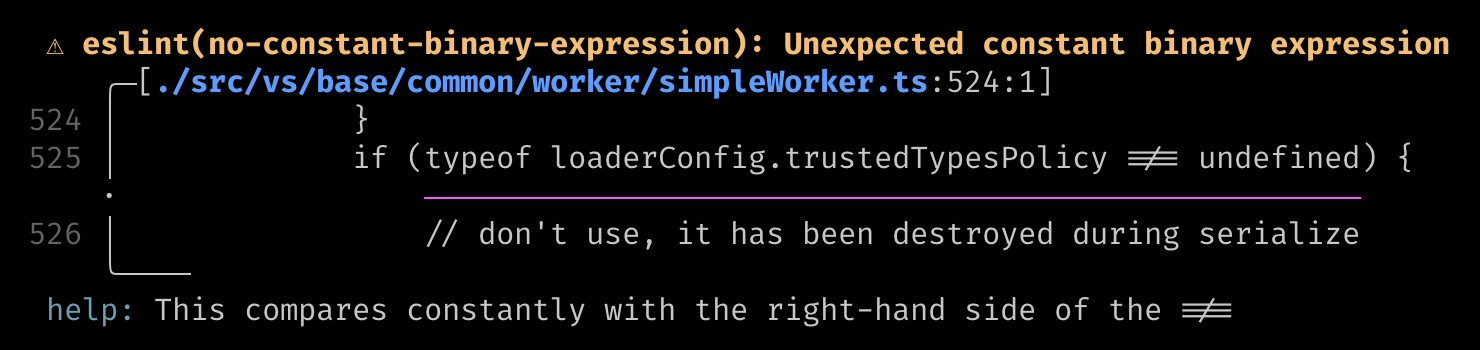
To give you an idea of its capabilities, here is an example from the vscode repository, which finishes linting 4800+ files in 0.7 seconds.
⚡️ Performance
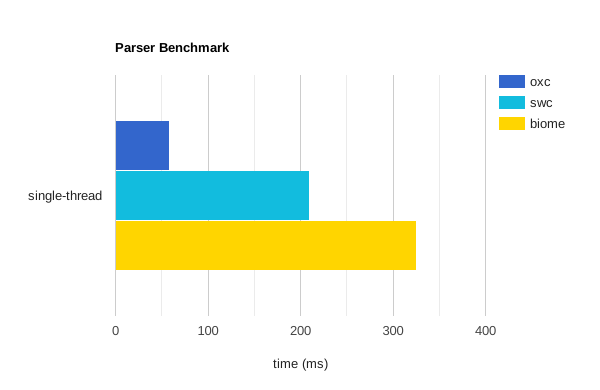
- The parser aims to be the fastest Rust-based ready-for-production parser.
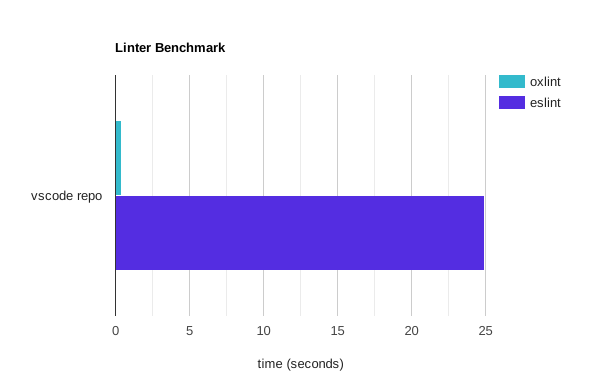
- The linter is more than 50 times faster than ESLint, and scales with the number of CPU cores.
⌨️ Rust, Node.js and Wasm Usage
Rust
Individual crates are published, you may use them to build your own JavaScript tools.
- The umbrella crate oxc exports all public crates from this repository.
- The AST and parser crates oxc_ast and oxc_parser are production ready.
- The resolver crate oxc_resolver for module resolution is also production ready.
- Example usages of these crates can be found in their respective
crates/*/examplesdirectory.
While Rust has gained a reputation for its comparatively slower compilation speed, we have dedicated significant effort to fine-tune the Rust compilation speed. Our aim is to minimize any impact on your development workflow, ensuring that developing your own Oxc based tools remains a smooth and efficient experience.
This is demonstrated by our CI runs, where warm runs complete in 3 minutes.
Node.js
- via napi: oxc-parser
Wasm
🎯 Tools
🔸 AST and Parser
Oxc maintains its own AST and parser, which is by far the fastest and most conformant JavaScript and TypeScript (including JSX and TSX) parser written in Rust.
As the parser often represents a key performance bottleneck in JavaScript tooling, any minor improvements can have a cascading effect on our downstream tools. By developing our parser, we have the opportunity to explore and implement well-researched performance techniques.
While many existing JavaScript tools rely on estree as their AST specification, a notable drawback is its abundance of ambiguous nodes. This ambiguity often leads to confusion during development with estree.
The Oxc AST differs slightly from the estree AST by removing ambiguous nodes and introducing distinct types.
For example, instead of using a generic estree Identifier,
the Oxc AST provides specific types such as BindingIdentifier, IdentifierReference, and IdentifierName.
This clear distinction greatly enhances the development experience by aligning more closely with the ECMAScript specification.
🏆 Parser Performance
Our benchmark reveals that the Oxc parser surpasses the speed of the swc parser by approximately 3 times and the Biome parser by 5 times.
How is it so fast?
- AST is allocated in a memory arena (bumpalo) for fast AST memory allocation and deallocation.
- Short strings are inlined by CompactString.
- No other heap allocations are done except the above two.
- Scope binding, symbol resolution and some syntax errors are not done in the parser, they are delegated to the semantic analyzer.
🔸 Linter
The linter embraces convention over configuration, eliminating the need for extensive configuration and plugin setup. Unlike other linters like ESLint, which often require intricate configurations and plugin installations (e.g. @typescript-eslint), our linter only requires a single command that you can immediately run on your codebase:
npx oxlint@latest
🏆 Linter Performance
The linter is 50 - 100 times faster than ESLint depending on the number of rules and number of CPU cores used. It completes in less than a second for most codebases with a few hundred files and completes in a few seconds for larger monorepos. See bench-javascript-linter for details.
As an upside, the binary is approximately 5MB, whereas ESLint and its associated plugin dependencies can easily exceed 100.
You may also download the linter binary from the latest release tag as a standalone binary, this lets you run the linter without a Node.js installation in your CI.
How is it so fast?
- Oxc parser is used.
- AST visit is a fast operation due to linear memory scan from the memory arena.
- Files are linted in a multi-threaded environment, so scales with the total number of CPU cores.
- Every single lint rule is tuned for performance.
🔸 Resolver
Module resolution plays a crucial role in JavaScript tooling, especially for tasks like multi-file analysis or bundling. However, it can often become a performance bottleneck. To address this, we developed oxc_resolver.
The resolver is production-ready and is currently being used in Rspack and Rolldown. Usage and examples can be found in its own repository.
🔸 Transformer (Transpiler)
A transformer is responsible for turning higher versions of ECMAScript to a lower version that can be used in older browsers. We are currently focusing on the architecture. See Milestone 1 for details.
🔸 Minifier
JavaScript minification plays a crucial role in optimizing website performance as it reduces the amount of data sent to users, resulting in faster page loads. This holds tremendous economic value, particularly for e-commerce websites, where every second can equate to millions of dollars.
However, existing minifiers typically require a trade-off between compression quality and speed. You have to choose between the slowest for the best compression or the fastest for less compression. But what if we could develop a faster minifier without compromising on compression?
We are actively working on a prototype that aims to achieve this goal, by porting all test cases from well-known minifiers such as google-closure-compiler, terser, esbuild, and tdewolff-minify.
Preliminary results indicate that we are on track to achieve our objectives. With the Oxc minifier, you can expect faster minification times without sacrificing compression quality.
🔸 Formatter
While prettier has established itself as the de facto code formatter for JavaScript, there is a significant demand in the developer community for a less opinionated alternative. Recognizing this need, our ambition is to undertake research and development to create a new JavaScript formatter that offers increased flexibility and customization options.
The prototype is currently work in progress.
✍️ Contribute
See CONTRIBUTING.md for guidance.
Check out some of the good first issues or ask us on Discord.
If you are unable to contribute by code, you can still participate by:
- Add a GitHub Star to the project.
- Join us on Discord.
- Follow me on twitter and tweet about this project.
📚 Learning Resources
- My small tutorial on how to write a JavaScript Parser in Rust
- My small article Pursuit of Performance on Building a JavaScript Compiler
- And more
🤝 Credits
This project was incubated with the assistance of these exceptional mentors and their projects:
- Biome - @ematipico
- Ruff - @charliermarsh, @MichaReiser
- quick-lint-js - @strager
- elm-review - @jfmengels
❤ Who's Sponsoring Oxc?

📖 License
Oxc is free and open-source software licensed under the MIT License.
Oxc ports or copies code from other open source projects, their licenses are listed in Third-party library licenses.