| dist | ||
| docs | ||
| example | ||
| src | ||
| test | ||
| .gitignore | ||
| LICENSE | ||
| markdown.d.ts | ||
| package-lock.json | ||
| package.json | ||
| README.md | ||
| wasmc.js | ||

markdown-wasm
Very fast Markdown parser & HTML renderer implemented in WebAssembly
- Zero dependencies
- Portable
- Simple API
- Fast and efficient
Based on md4c
Examples
In NodeJS, single file with embedded compressed WASM
const markdown = require("./dist/markdown.node.js")
console.log(markdown.parse("# hello\n*world*"))
ES module, WASM loaded async from separate file
import * as markdown from "./dist/markdown.es.js"
await markdown.ready
console.log(markdown.parse("# hello\n*world*"))
In web browser, WASM loaded async from separate file
<script src="markdown.js"></script>
<script>
window["markdown"].ready.then(markdown => {
  console.log(markdown.parse("# hello\n*world*"))
})
</script>
Install
npm install markdown-wasm
Benchmarks
The test/benchmark directory contain a benchmark suite which you can
run yourself. It tests a few popular markdown parser-renderers by parsing & rendering a bunch
of different sample markdown files.
The following results were samples on a 2.9 GHz MacBook running macOS 10.15, NodeJS v14.11.0
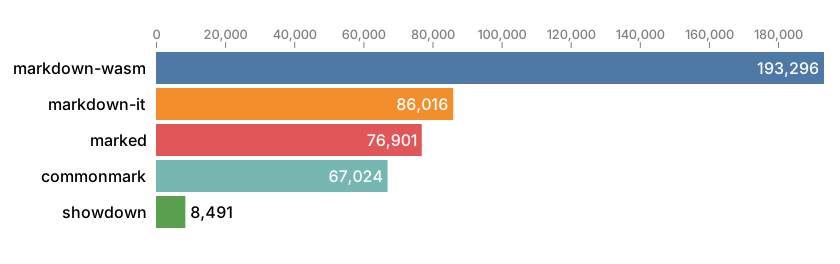
Average ops/second
Ops/second represents how many times a library is able to parse markdown and render HTML during a second, on average across all sample files.
Average throughput
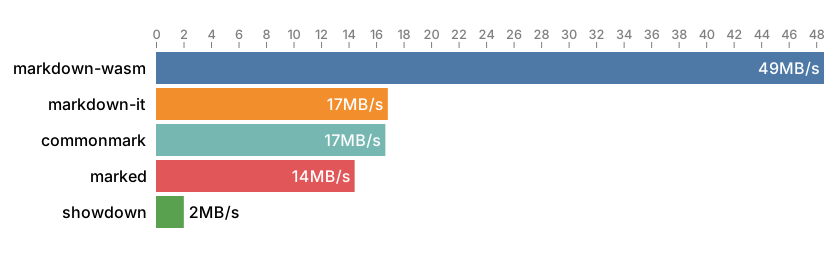
Throughput is the average amount of markdown data processed during a second while both parsing and rendering to HTML. The statistics does not include HTML generated but only bytes of markdown source text parsed.
Min–max parse time
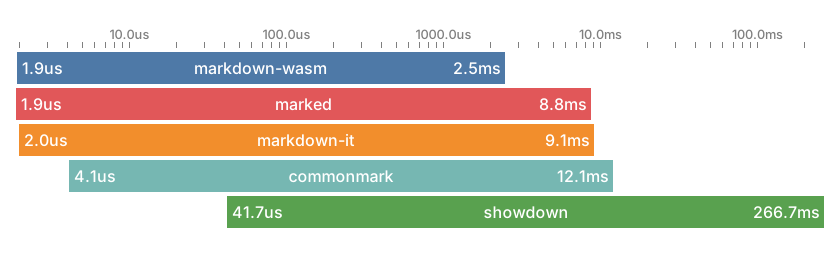
This graph shows the spread between the fastest and slowest parse-and-render operations for each library. Lower numbers are better.
API
/**
 * parse reads markdown source at s and converts it to HTML.
 * When output is a byte array, it will be a reference.
 */
export function parse(s :Source, o? :ParseOptions & { asMemoryView? :never|false }) :string
export function parse(s :Source, o? :ParseOptions & { asMemoryView :true }) :Uint8Array

/** Markdown source code can be provided as a JavaScript string or UTF8 encoded data */
type Source = string|ArrayLike<number>

/** Options for the parse function */
export interface ParseOptions {
  /**
   * Customize parsing.
   * If not provided, the following flags are used, equating to github-style parsing:
   *   COLLAPSE_WHITESPACE
   *   PERMISSIVE_ATX_HEADERS
   *   PERMISSIVE_URL_AUTO_LINKS
   *   STRIKETHROUGH
   *   TABLES
   *   TASK_LISTS
   */
  parseFlags? :ParseFlags

  /**
   * asMemoryView=true causes parse() to return a view of heap memory as a Uint8Array,
   * instead of a string.
   *
   * The returned Uint8Array is only valid until the next call to parse().
   * If you need to keep the returned data around, call Uint8Array.slice() to make a copy,
   * as each call to parse() uses the same underlying memory.
   *
   * This only provides a performance benefit when you never need to convert the output
   * to a string. In most cases you're better off leaving this unset or false.
   */
  asMemoryView? :boolean
}

/** Flags that customize Markdown parsing */
export enum ParseFlags {
  /** In TEXT, collapse non-trivial whitespace into single ' ' */ COLLAPSE_WHITESPACE,
  /** Enable $ and $$ containing LaTeX equations. */              LATEX_MATH_SPANS,
  /** Disable raw HTML blocks. */                                 NO_HTML_BLOCKS,
  /** Disable raw HTML (inline). */                               NO_HTML_SPANS,
  /** Disable indented code blocks. (Only fenced code works.) */  NO_INDENTED_CODE_BLOCKS,
  /** Do not require space in ATX headers ( ###header ) */        PERMISSIVE_ATX_HEADERS,
  /** Recognize e-mails as links even without <...> */            PERMISSIVE_EMAIL_AUTO_LINKS,
  /** Recognize URLs as links even without <...> */               PERMISSIVE_URL_AUTO_LINKS,
  /** Enable WWW autolinks (without proto; just 'www.') */        PERMISSIVE_WWW_AUTOLINKS,
  /** Enable strikethrough extension. */                          STRIKETHROUGH,
  /** Enable tables extension. */                                 TABLES,
  /** Enable task list extension. */                              TASK_LISTS,
  /** Enable wiki links extension. */                             WIKI_LINKS,

  /** Default flags */                                            DEFAULT,
  /** Shorthand for NO_HTML_BLOCKS | NO_HTML_SPANS */             NO_HTML,
}
See markdown.d.ts
Building from source
npm install
npx wasmc
Build debug version of markdown into ./build/debug and watch source files:
npx wasmc -g -w