# markdown-wasm
Very fast Markdown parser & HTML renderer implemented in WebAssembly
- Zero dependencies
- Portable & safe
- [Simple API](#api)
- [Fast and efficient](#benchmarks)
- JS + WASM is only 31 kB gzipped
Based on [md4c](http://github.com/mity/md4c)
## Examples
In NodeJS, single file with embedded compressed WASM
```js
const markdown = require("./dist/markdown.node.js")
console.log(markdown.parse("# hello\n*world*"))
```
ES module with WASM loaded separately
```js
import * as markdown from "./dist/markdown.es.js"
await markdown.ready
console.log(markdown.parse("# hello\n*world*"))
```
Web browser
```html
```
## Install
```
npm install markdown-wasm
```
## Benchmarks
The [`test/benchmark`](test/benchmark) directory contain a benchmark suite which you can
run yourself. It tests a few popular markdown parser-renderers by parsing & rendering a bunch
of different sample markdown files.
The following results were samples on a 2.9 GHz MacBook running macOS 10.15, NodeJS v14.11.0
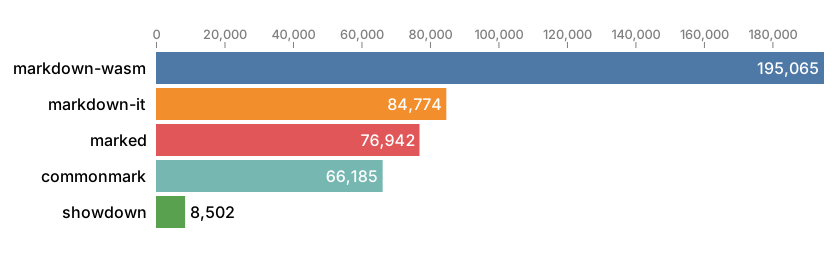
#### Average ops/second
Ops/second represents how many times a library is able to parse markdown and render HTML
during a second, on average across all sample files.
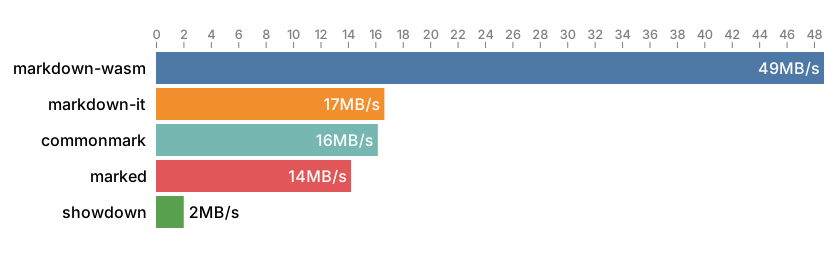
#### Average throughput
Throughput is the average amount of markdown data processed during a second while both parsing
and rendering to HTML. The statistics does not include HTML generated but only bytes of markdown
source text parsed.
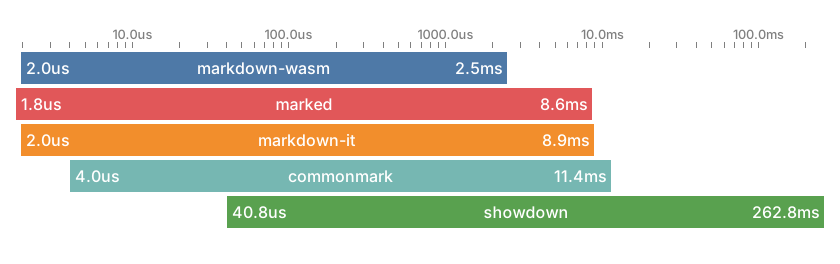
#### Min–max parse time
This graph shows the spread between the fastest and slowest parse-and-render operations
for each library. Lower numbers are better.
See [`test/benchmark`](test/benchmark#readme) for more information.
## API
```ts
/**
* parse reads markdown source at s and converts it to HTML.
* When output is a byte array, it will be a reference.
*/
export function parse(s :Source, o? :ParseOptions & { asMemoryView? :never|false }) :string
export function parse(s :Source, o? :ParseOptions & { asMemoryView :true }) :Uint8Array
/** Markdown source code can be provided as a JavaScript string or UTF8 encoded data */
type Source = string|ArrayLike
/** Options for the parse function */
export interface ParseOptions {
/**
* Customize parsing.
* If not provided, the following flags are used, equating to github-style parsing:
* COLLAPSE_WHITESPACE
* PERMISSIVE_ATX_HEADERS
* PERMISSIVE_URL_AUTO_LINKS
* STRIKETHROUGH
* TABLES
* TASK_LISTS
*/
parseFlags? :ParseFlags
/**
* asMemoryView=true causes parse() to return a view of heap memory as a Uint8Array,
* instead of a string.
*
* The returned Uint8Array is only valid until the next call to parse().
* If you need to keep the returned data around, call Uint8Array.slice() to make a copy,
* as each call to parse() uses the same underlying memory.
*
* This only provides a performance benefit when you never need to convert the output
* to a string. In most cases you're better off leaving this unset or false.
*/
asMemoryView? :boolean
}
/** Flags that customize Markdown parsing */
export enum ParseFlags {
/** In TEXT, collapse non-trivial whitespace into single ' ' */ COLLAPSE_WHITESPACE,
/** Enable $ and $$ containing LaTeX equations. */ LATEX_MATH_SPANS,
/** Disable raw HTML blocks. */ NO_HTML_BLOCKS,
/** Disable raw HTML (inline). */ NO_HTML_SPANS,
/** Disable indented code blocks. (Only fenced code works.) */ NO_INDENTED_CODE_BLOCKS,
/** Do not require space in ATX headers ( ###header ) */ PERMISSIVE_ATX_HEADERS,
/** Recognize e-mails as links even without <...> */ PERMISSIVE_EMAIL_AUTO_LINKS,
/** Recognize URLs as links even without <...> */ PERMISSIVE_URL_AUTO_LINKS,
/** Enable WWW autolinks (without proto; just 'www.') */ PERMISSIVE_WWW_AUTOLINKS,
/** Enable strikethrough extension. */ STRIKETHROUGH,
/** Enable tables extension. */ TABLES,
/** Enable task list extension. */ TASK_LISTS,
/** Enable wiki links extension. */ WIKI_LINKS,
/** Default flags */ DEFAULT,
/** Shorthand for NO_HTML_BLOCKS | NO_HTML_SPANS */ NO_HTML,
}
```
See `markdown.d.ts`
## Building from source
```
npm install
npx wasmc
```
Build debug version of markdown into ./build/debug and watch source files:
```
npx wasmc -g -w
```
If you need special builds, like for example an ES module with embedded WASM,
edit the `wasmc.js` file and add `module({...})` directives.
Example:
```js
module({ ...m,
name: "markdown-custom",
out: outdir + "/markdown.custom.js",
embed: true,
format: "es",
})
```