mirror of
https://github.com/danbulant/dots-hyprland
synced 2026-05-19 04:08:48 +00:00
No description
| .config | ||
| .github | ||
| arch-packages | ||
| Extras | ||
| licenses | ||
| scriptdata | ||
| .gitattributes | ||
| .gitignore | ||
| CONTRIBUTING.md | ||
| diagnose | ||
| install.sh | ||
| LICENSE | ||
| manual-install-helper.sh | ||
| README.md | ||
| uninstall.sh | ||

Quickshell-powered illogical-impulse
Current status
It's ready if you don't need localization... so quite likely
Instructions
- Installation: Clone the repo, checkout this branch and run
install.sh - Dolphin fix so it won't ask which program to open file with every time:
sudo pacman -S archlinux-xdg-menu && XDG_MENU_PREFIX=arch- kbuildsycoca6; sudo ln -s /etc/xdg/menus/plasma-applications.menu /etc/xdg/menus/applications.menu - TODO: Update install script to include the above fix
【 end_4's Hyprland dotfiles 】




• overview •
Notable features
- Overview: Shows open apps. Type to search/calculate/run
- AI: Gemini, Ollama models and more with configuration
- Autogenerated colors: Accessible and beautiful Material colors based on wallpaper
- Transparent installation: Every command is shown before it's run
Instructions
- Prerequisite: Your system works. That's it. You don't have to reinstall your system!
- Automatic, but guided and transparent, installation for Arch(-based) Linux:
bash <(curl -s "https://end-4.github.io/dots-hyprland-wiki/setup.sh")
-
Manual installation, other distros and more:
- See the Wiki
-
Default keybinds: Should be somewhat familiar if you've used Windows or GNOME.
- For a list, hit
Super+/ - For a terminal, hit
Super+Enter
- For a list, hit
Software overview
| Software | Purpose |
|---|---|
| Hyprland | The compositor (for noobs, you can just call it a window manager) |
| Quickshell | A QtQuick-based widget system, responsible for the status bar, sidebars, etc. |
| Fuzzel | For clipboard and emoji picker |
- For a more comprehensive list of dependencies, see scriptdata/dependencies.conf
Help improve these dotfiles
- Try the Quickshell-powered version at
ii-qsbranch - It comes with major improvements, and you're free to make suggestions 👉 #1276
• screenshots •
Main branch (illogical-impulse)
AI
Sidebar offers online and offline chat. Text selection summary is offline only for privacy.
Notifications, music controls, system, calendar
On the sidebar: flicking the notification
Intuitive window management
You can also drag and drop windows across workspaces
Power to weebs
Get yande.re and konachan images from sidebar
Unsupported stuff
- The pics are here mainly for your viewing pleasure
- The files are still available, feel free to grab them from the
archivebranch if you're willing to see some spaghetti and troubleshoot - Click image for a presentation video
m3ww
NovelKnock
Hybrid
Windoes
• thank you •
- @clsty for making an actually good install script + many other stuff that I neglect
- @midn8hustlr for greatly improving the color generation system
- Quickshell: Soramane, FridayFaerie, nydragon
- AGS: Aylur's config, kotontrion's config
- EWW: fufexan's config (he thanks more people there btw)
- AI bots for providing useful examples
• stonks •
- Funny useful number: https://github.com/sponsors/end-4
- Funny useless number:
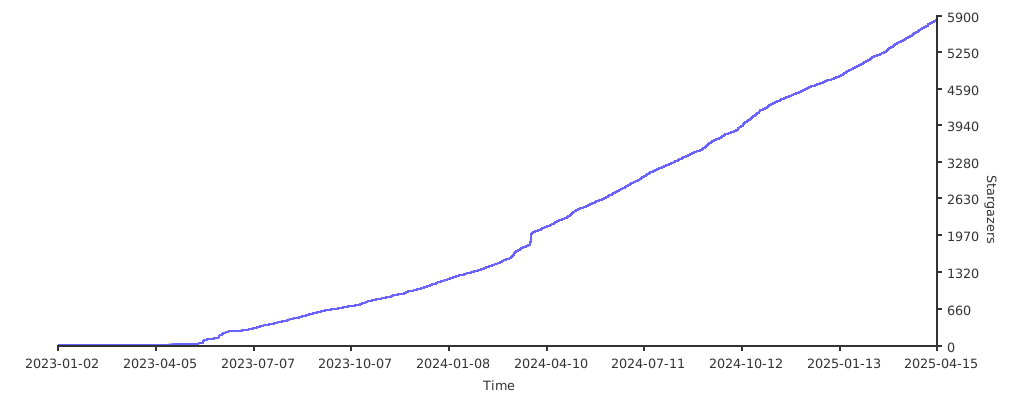
- Jokes aside i do appreciate both
• inspirations/copying •
- Inspiration: osu!lazer, Windows 11, Material Design 3, AvdanOS (concept)
- Copying: The license allows you to. Personally I have absolutely no problem with others redistributing/recreating my work. There's no "stealing" (unless you do weird stuff and violate the license). (this note is here because some people actually asked)